Showing posts with label Facebook. Show all posts

Friday, 11 October 2013

Trick To Download Albums From Facebook

Facebook is a leading social networking site.We can do a lot of things with facebook such as updating status,uploading images and videos,sharing,liking,playing games etc.We are uploading many images and creating albums in facebook but how to download an album?

Download Facebook Albums

By using the following technique you can download album of your friends album.

Let us start our tutorial.Now you have to follow this step to download album

  1. First,Go to Facebook2Zip and then click on "Login with facebook"
  2. Now you will be redirected to a page,there you have to select one of your friends profile.
  3. Now,after selecting your friends profile,select an album which you want to download.
  4. Then you have to click on download option
  5. Now,download starts and you had successfully downloaded your desired friends album

Saturday, 17 August 2013

How To Hack Facebook Using 3 Trusted Friends Method

Hello everyone "Hacking Facebook Account" is most popular term in the Web,I had found a new security hole(trick) in the FB,which is hacking facebook using three trusted friends technique.
So now we can Hack Facebook easily using its official feature.This hack is done with the help of new password recovery feature of Facebook.Facebook recently released new way to Recover Account Password using"Three Trusted Friends".If we forgot the Facebook account password then FB will send unique security code to three friends. Then we have to ask that security code to each three friend. And after giving that codes to FB we can recover the Facebook password.
Now we can use this feature to Hack Facebook Account Free So here we are going to misuse this new feature of FB to Hack Facebook Account. We have to just create 3 fake Fb accounts and then have to send the friend request from those 3 fake accounts to the victim. Victim must accept those friend request. Now we can use this above "Three Trusted Friend" feature to reset the victims' Facebook account password.
Note:- The 3 fake account must be 7 day older, otherwise this Facebook Hack will not work So lets start on our trick on how Hack Facebook Account.
Step 1:Go to Facebook.com and click on Forgot Password.
Step 2:Now give the victim's Facebook account email or if give the FB username or Profile name and click on search. And then you will get the victims profile account. Just click on "This is my Account".
Step 3:Then click on "No longer have access to this".
Step 4:Now you will be asked to enter new email address, just enter your own new email address.
Step 5:Now Facebook will ask you to give security question's answer. Not to worry, just enter wrong answer thrice and you will be taken to the new page.
Step 6:Here is the main part of Hacking Of Facebook Account. Click on Continue and FB will ask you to select 3 Trusted Friends. Their will be a full friend's list of the victim which also includes your previously created"Three Fake Facebook Account" .Just select that three accounts and then Facebook will send security codes to our fake accounts. Now collect those security codes and enter it. Then Facebook will send"Password Recovery Email" at the email address we entered in 4th step. Thus you can easily reset the password of victim's account. Now we have successfully done with Hack Facebook Accounts.This is a big loop hole in facebook.This Hack is just for educational purpuse only,not to misuse it.

Saturday, 27 July 2013

How to prevent your adfly links from getting banned


Do you want to share your links at youtube, facebook, bitly and other services and you can't because adfly is banned in these websites?

The solution is here!

All you need is to already have an adfly account - Register HERE
then visit this page https://adf.ly/publisher/tools#tools-domains

Now available: use your own "sub domain" or "domain name" with AdF.ly! Combined with a custom header and logo, you can now brand your AdF.ly links as your own website!

What is a custom domain? And how does it work?

A custom domain name allows you to use your own domain with our system. So when you shrink a link in your account, instead of it looking like:

http://adf.ly/A

it will look like:

http://www.example.com/A

The shortened URL will be branded like your website, giving increased confidence to your visitors that the destination website is in fact what they are looking for.

If someone else has abused the service in the past and the AdF.ly domain has been blocked, this is not fair on you. Now by using your own domain - you are in full control.

They look great! If you run a forum about F1 racing and your website is http://www.f1forum.com, you could use http://links.f1forum.com on your AdF.ly account.

Everything about the links will work exactly as it does on the AdF.ly domain, the pay rates are the same and the same rules still apply.

DNS Instructions

Before you can use your domain on adf.ly you will need to update a DNS record for it. This is quite an advanced feature so please only proceed if you are experienced with DNS.

The only record needed is a CNAME RECORD, you need create / edit your domain (or sub domain) CNAME RECORD to point to address:

custom.adf.ly

Exactly how this done depends on where your domain is hosted.. please check with your Web Hosting provider or Domain Registrar if you are unsure.

WARNING: Any existing website on the domain / sub domain who's CNAME RECORD has been updated will no longer work.

Wednesday, 19 June 2013

Top 15 Social Networking Websites in World


Hello Dear Top Website Searchers....!

I Have Good News For Your Information.....!

I Have Search And Make A Top 15 List Of Social Networking Websites In World.....!


UmerPrince


Credits = e Marketer

Wednesday, 12 June 2013

How to promote your adfly links through Socia Media


In this post i will show you some cool websites that can help you to get more traffic to your adfly links from the social media. The following websites use exchange system that helps you increase your website popularity, your social presence and more.
The exchange system is very simple. Every time you like, follow, or view another members social media pages you will receive coins which then you can use to get more followers, likes, views or visitors to your website or social media pages. The system also allows you to pick and choose who you want to follow, like, view and skip those who you are not interested in.

Social Media Supported:

Facebook Likes
Facebook Shares
Facebook Followers
Google +1
Instagram Likes
Instagram Followers
LinkedIn Shares
MySpace Connections
Pinterest
Reverbnation Fans
Soundcloud Followers
Stumbleupon Followers
Website Traffic Exchange
Twitter Follows
Twitter ReTweets
Youtube Favorites
Youtube Likes
Youtube Views
Youtube Subscribers

1. social-boost.org
Social Boost
Register for Free HERE

2. fast-ex.net
Register for Free HERE

4. flibay.com
flibay
Register for Free HERE

Thursday, 9 May 2013

How to make money from Facebook with adfly [New Guide 2013]


Everyone is concern about facebook blocking adfly links , well there is always a way to make the money from facebook you just have to follow my instructions. I am going to give you a trick that did work for me. This is a new 2013 trick!


First of all you will need a facebook account with more than 250 friends - Register HERE
if you have less then i don't think you will see a result with this and you should move forward to make money with twitter and adfly or make money with pinterest and adfly!

What you really need to do is get any link or share any video to your friends but first 
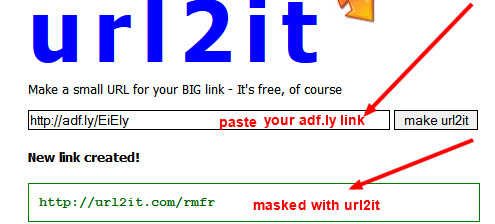
  1. Shorten any URL using Adf.ly and copy that short URL
  2. Now go to url2it.com and enter you Adf.ly shorten URL there and click “Make url2it”
  3. There will be new link created for you.
  4. Now you can easily post this URL to Facebook without any restriction.
When your friends click on the link that you will post on facebook it will be redirected to ADFLY and you still will make the money.!


NOTE: When linking, try not to use the default adfly URL, be different and less recognizable, use one of their other redirect options

If you haven’t yet, sign up to Adf.ly HERE!!!

Tuesday, 7 May 2013

Earn $4000 easily per month with Adfly


The best way to earn money

Adf.ly detailed information
Adf.ly is a site which allows you to shorten your URL, it is no different from bit.ly and tinyurl.com. However it does differ because they have ad twist. When ever someone opens the short url there is a 5 second frame which shows an ad. The timing is very short and thus majority of the people using this service don’t mind the wait in return for using the system.


Benefits
Traffic is targeted by country
It is very cheap: 4$-8$ per 1000 unique views (see detailed payout rates here)
Despite the low prices there is some conversion

What is URL shorteners?
URL shorteners can be used to shorten long URLs (please also note that you may shorten virtually any URL you want to, the URL does not have to be long!).

So how much money can you can you make with Adfly? It's a good question. The amount of money you can make with your Adf.ly links depends on where the people who click your Adf.ly links are located.

How much money can I make?
The average rate of pay is $4.00 per thousand clicks. $4.00 may sound small, but just think for a second. How many people use Facebook? Over 500 million people use Facebook on a daily basis. If you could get even a small portion of Facebook users to click on your links, you could be earning a tidy amount of money. A great way to attract lots of users to click on your links is to set up a Facebook group. Many of these groups have more than a million users - so if you get your thinking cap on, you can make good money very quickly!!!. You can also make more money by making videos and post them to Youtube and leave a link in the description.

You can also earn much money by bringing referrals. Personally I have earned more money from my refs than from other ways (learn how to get hundreds of referrals easily)

Adf.ly accounts
Adf.ly has an easy to reach payment threshold, so once you have earned $5.00 on your Adf.ly account, your earnings will automatically be paid into your PayPal or Payoneer account. If you don't have a Paypal or Payoneer account don't despair, they're both free to join and simple to use.
Sign Up now to Adf.ly

How to Get Traffic For your Links:
Now the question is that how we can get traffic for our links and get more money. So for this there a lot of tips and tricks to get traffic to your links which are given below:

1. Facebook.com
Millions of people use Facebook everyday, so Facebook is the best way to post your links and publish them. (see tutorial here) 

2. Twitter.com
Get some followers on twitter and post your links there so your followers can click on these links. (guide1) (guide2)

3. Youtube.com
You can also use Youtube.com for your links by uploading videos. (see tutorial here)

4. Pinterest.com
Publish pictures of popular content with links of youw website. (see tutorial here)

5. Make a Website
You can make a free website (blog or free google site) and post your links on the website with your content. (see tutorial here) (see automated system here)

6. Ask your Friends
Ask your friends to follow the links on your website.

7. Use Forums
Write posts or comments on forums to promote your links and website.

8. Bring Referrals
Referrals can really boost your earnings. You will receive 20% of their earnings and 5% from the money they spend on advertising with adfly. Learn how to get hundreds of referrals easily HERE

Wednesday, 13 March 2013

Facebook Introducing the Subscribe Button for Websites

Facebook Subscribe Show Faces
Hi Dear Bloggers.....!

I Have A Tip For Your Facebook Subscribers ....!
Add A Subscribe Button To Your Blog Free and Easy Just See Below Steps....!
After Adding This Widget Look Like This.........


  1. Go To Facebook Follow Button
  2. Then In Profile URL Box Write Your Profile URL
  3. Optional On Layout Box Select Your Favorite Style
  4. and Other Show Faces, Color Scheme, Font and Width you Can Change ....!
  5. and Now Click On Get Code Box
  6. Then Click On I frame And Copy First Code
  7. and Paste On Your Blog....!
Happy Blogging.......!

How To Download Facebook Videos ?

Hi Friends ....and Facebook Users I Have A Awesome Trick For You All.........!Must Read Below.
While watching videos on Facebook Sometime you like certain video and want to download it on your computer but you are taken a step back because you don't know how to do that. There are tools and software available to download videos from Utube and other Famous video sites but downloading videos from facebook is something you are not familiar with. Downloading facebook videos is very very easy and the best thing about  it is that it does not require any software. In this tutorial i will Show you, How to download videos from facebook in few simple steps. See Below....!
download facebook videos

How To Download Facebook Videos ?

1. Open the facebook video you want to download.
2. Copy the url as shown below.

download facebook videos

3. Go to savefrom  Clicking Here
4. Paste the url copied in step 2 in input area as shown below and click on download.

download facebook videos

5. After clicking on download, available video format for the video will appear on right side just below the download button. Click on video format you like to download.

download facebook videos

6. Download will start the moment you click on video format. Enjoy!!
Credits = mybloggersworld.blogspot.in

Saturday, 9 March 2013

How to find your Facebook Page ID

Get your Page ID in two easy steps!

Many Facebook Apps – including ours – require you to enter your Facebook Page ID (or Profile ID).
Your Page’s (or Profile’s) ID is a numeric value that uniquely identifies it inside Facebook’s database.

Step 1

To find it, simply go to your Page (you have to be the Page’s Administrator) or your personal profile, and hover over your Profile image or Cover Photo.
As soon as your cursor’s position is over the image, a link appears on the right corner of the image that signals your ability to modify your settings.

Right-click on the image and copy the link!

step1 find your facebook page or profile id

Step 2

Paste the link into the Address Bar in your browser, a text editor or anywhere else that’s handy.
Your Page’s or Profile’s ID is the number after the LAST period.
The first number (fbid) is the DB id of the image, the second one (set=a.) is the album id, and that one is connected with a period to your userID”
From the address bar you can now simply copy your page ID to your clipboard.
step2 find your facebook page or profile id

via cell90.blogspot.com

Friday, 8 March 2013

With the new Facebook free calling app, your voice plan may be obsolete

Last month Facebook rolled out on its standalone messenger app an option to make free voice calls. This same functionality has now been added to its flagship iOS application. The new version 5.5 is currently live in the Apple’s App store and users that live in U.S. and Canada can now call friends for free just by hitting the button on the right hand side bar.
To see the voice-calling option you just have to tap on a friend’s name, the button will then show up on the top right corner of the screen. If that friend happens to be online at that particular time, the “Free call” button should be made clickable for you to dial them directly without having to know their number. In case the friend is not online the button will be grayed out.
Facebook usually uses its standalone app to test out new features on its smaller user base before releasing the final version on the main application.

Facebook started offering voice functionality earlier this year. The social network first began by offering users the ability to send a one minute voice message. Then the features was extended to the iOS and Android messenger applications. The next step was to test an open source VoIP calling option. It was first tested on Canadian iOS Messenger users that were using a data plan and later on the feature was introduced into the U.S market a few weeks later.
With its new voice calling feature it is obvious that Facebook is not much interested in strengthening its partnership with skype which had powered Facebook’s voice calling tests on the desktop in the past.

Entering voice messaging and VoIP world could be a way for Facebook to kick out the default calling apps on smartphones. Facebook knows that if it wants to remain the biggest social network, it can’t just limit itself to just news feeds and profiles. Knowing who a user is close enough to to exchange voice recordings and calls with will help Facebook determine which Friends on your “Friends’ list” you are really close to. This information can then help the social network improve on its algorithm in such a way that your news feed becomes more relevant in relation to the friends that matter to you.


If that plan should succeed there are more chances that users start using Facebook for friend to friend communication. Having this friend to friend free voice calls going on could open another revenue stream for Facebook. We already know the social giant is now willing to charge users for sending messages to strangers on its network. It will not be a surprise if there is also a fee involved in voice calling a stranger.
Eventually this Facebook feature might be able to kill the calling aspect of the smartphone. As at now iPhone and iPad users should be able to download the latest update from iTunes. Android users will have to wait for a while as the Facebook team is testing it out first.
 Article Via www.SiteTrail.com

Facebook Redesign News Feed - How To Get New Design ?

As Facebook is one of the most popular social networking site, it tends to experiment with its design and add new features For example in 2012 it introduces Timeline and added feature of video calling. On Thursday facebook unveils its redesign News Feed. You can customize the News Feed by selecting options from feeds like: Most recent, friends, group, music etc. The great thing about the new design is that the customized settings will work on multiplatform for Example customized settings for News feed will be shown on your tablet as well as mobile phone or any other devices.
facebook new news feed design

How To Get New Design ?

If you join the wait list you will be one of few users who can experience this new feature before others, otherwise it will take few weeks to show up new design for your account. Follow the simple steps given below to try this new facebook look.

1. First Login to your Facebook account.
2. Then go to www.facebook.com/about/newsfeed
3. Now scroll to bottom of the page and click on Join Wait List


facebook new news feed design

Few ScreenShots Of New Design

If you are eager to see the new look of facebook, check out few screenschots of facebooks new design. 

facebook new news feed design

facebook new news feed design

facebook new news feed design

Video Of Facebook New Look


Popout
Article Via  mybloggersworld.blogspot.com

Friday, 1 March 2013

Worlds Top Websites : Take a Look Before 13 Years

Technology is binding more and more with our daily life.Millions & millions of peoples across the world now surfing in internet and gathering knowledge.Tim Berners-Lee  invented WWW in 1989,Many Tech giants stepped in to the world of WWW.We can surly say that,the field of WWW has accelerated their upheaval.We need to up-to-date our website regularly & need to apply our prudence in various occasions.In 2000 there is no Facebook,Twitter etc... Social Networking sites are  totally(Even classmates.com etc..there) absent,but today they all present. The presence of social media is reflected in the design field also.Here is a list of (Pictures) various popular companies Website in 2000 & see the Development of  web design field from 2000 to 2013. Lets start. We can start with Letter A (A for Apple).


Apple.com


2000


2013


Adobe.com


2000


2013


BBC.com

2000


2013


Google.com


2000

2013

Microsoft.com (My Favorite)

2000

2013


Yahoo.com

2000


2013


Myspace.com


2000

2013

Amazon.com


1999-2000


2013


(Article Via Boogali Blog)

Wednesday, 27 February 2013

Yahoo Tries to Go Social: Revamps Website with Facebook

It has been a tumultuous couple of years for Yahoo. Though its status as one of the world’s leading search engines and internet companies has not changed, the revenues and profits have been on the decline. The situation has been made worse with the succession of CEOs that have been shown the door or have quit the position themselves. In a bid to reprieve the situation, Yahoo has joined hands with Facebook to revamp its website. In a nutshell, Yahoo is trying to become social.

Yahoo Tries to Go Social: Revamps Website with Facebook

Taking a Cue from Facebook

Over the past few years, Yahoo has been losing out to Google and Facebook. The search engine and social network have been taking away its users. As a result, Yahoo has been losing preference with advertisers as businesses don’t want to spend too much on placing ads on the website. During the same time, the ad revenue for Facebook and Google both has been on the rise. Yahoo has now taken a cue from Facebook to make some changes to its website.
In a bid to emulate the social network, Yahoo has teamed up with it to introduce a few new features that would make it more user-friendly. Now, people would be able to see the pages and other content ‘liked’ by their Facebook friends. A newsfeed feature has also been installed which shows news in the same way as you see updates on Facebook. The overhaul of the website was made public by the current CEO Marissa Mayer.

More Changes Expected

Yahoo is not going to stop the changes to its service offering with the revamp of the website. Some more changes are to be made to their internet shop windows. The changes are currently being worked on and will be revealed in the days to come. Most of all, Yahoo is trying to make itself compatible for mobile users. One area where they have been losing out is the mobile usage. The newer and better Yahoo app would take care of that problem.

What Does Facebook Gain?

Even though Facebook is not a search engine, it is a competitor to Yahoo. One wonders why they teamed up with Yahoo for revamping the website. The answer is pretty simple: the Google factor. Facebook has to contend with Google for ad revenue, both on conventional computers and mobile devices. By helping Yahoo revamp, Facebook might be able to take away some of Google’s visitors. In fact, some experts predict this move would have a positive impact on Facebook’s growing user base.

Final Word

As with all things in the online world, the impact of this move by Yahoo will only be seen in the future. Nothing can be said with certainty regarding whether Yahoo would be able to reclaim its share of online users. The only thing which is becoming somewhat certain is that Marissa Mayer is here to stay. The website revamp is one of several positive steps she has taken to improve Yahoo’s situation. The revenues might not increase immediately but this move is constructive for sure.
[Image via popsop And Tech Beat]

Monday, 25 February 2013

How to Use Facebook Graph Search

Hi Dear Visitor ! Now Facebook Launch New Graph Search.
So Why Not Learn About This ? Read Below. 

Get and Use Facebook Graph Search !

What is Facebook Graph Search? Why is privacy such a hot topic with Facebook Graph Search? Get the latest Facebook Graph Search updates in 1 minute videos


What exactly Facebook graph search is?

Facebook graph search help you find photos,places and things in a new way. Explore your world through photos or explore the places, find peoples who are sharing your interest(who have common interest), Find the peoples who like the same activities.
Facebook New Graph Search Tool:
Facebook introducing graph search(beta), With this new product users can easily find the relevant photos,places, hobbies of friends or any combination of them.
Here are some examples you can discover.

  •     You can find photos you like
  •     photos that you and your friends like
  •     photos before a a particular Date.
  •     photos of friends in a specific place
  •     Music your friends Like
  •     cites your friends and family visited.
  •     Peoples who like cycling or other thing
  •     restaurants or other specific places where friends have been to

This specific tool is still under progress. and Facebook team of developers are working on it. and it will be released officially soon.

Building Graph Search- How it will Work
According to Mark Zuckerberg (Founder and CEO of Facebook):

Mark Zuckerberg (Founder and CEO of Facebook)
Founder and CEO of Facebook
There are few fillers of Facebook, one is news feed, where you can see everything happening and important stuffs.
Another is timeline where you can create everything about you in one place. according to him graph search is is going to be another filler.

Tom Stocky (Product Directer):
tom stocky product director of Facebook
tom stocky product director of facebook
product director
There are simple things that peoples want to do. they wanna find photos, photos of friends and friends who visited a specific place. they are really hard things. you have to visit to different pages. But it will be now easy with this new graph search.
Kari Lee(Engineering Manager):
In web search it's very often if you search for apple and others also for apple, we will get same results, while on  the Facebook when if you do the same search, it will be completely different search results because of it's deep personalization.

(via Trixking)

Sunday, 24 February 2013

Facebook Doesn’t Have to Pay Taxes

Wouldn’t it be nice if you had no taxes to pay, and the same year, received a nearly $430 million tax return on top of $1.1 billion in annual revenue? That would be more than nice, and is currently Facebook’s fortunate situation.

UmerPrince

Facebook Doesn’t Have to Pay Taxes

This shocking revelation ultimately begs the question of “Who is responsible for this oversight?”  Is this just another example of a mega-billion dollar corporation finding tax loopholes to take advantage of the book’s fortunate situation due to the tax deductibility of its executive stock options. According to the group Citizens for Tax Justice, last year many of Facebook’s employees cashed in their stock options. The money received by the employees for cashing in is considered the same as wages by the U.S. government. Which in turn, grants Facebook some very generous tax deductions for each of the stock options that were cashed in.

Facebook is not the first major corporation to use this tax break to its advantage and is just one of many major businesses that are accused of not paying their share of taxes. But Facebook and other corporations can legitimately deduct stock options given to their executives. Many companies whose employees benefit from stock options receive monstrous deductions. There were 26 companies including corporate giants like General Electric, Verizon and Boeing, with total combined profits of $205 billion, that paid zero federal income tax between the years of 2008 and 2011. This stock option loophole will likely prevent Facebook from paying in billions of  dollars in taxes and even allow them to ride for years on these deductions without ever paying in.

Although Facebook isn’t really paying Federal taxes in 2012, it is just remitting the tax on behalf of the employees.This lack of taxation for last fiscal year comes from the fact that restricted stock units are a form of equity compensation. So, in other words, instead of giving the employees stock as incentives, Facebook made a contractual promise to give them shares later, after the I.P.O. settling the limited stock units by withholding the quantity of tax due at an estimated mutual federal and state tax rate of 45 percent.

Regardless of the fact that Facebook’s hefty deductions are legit, average taxpayers may find this news unfair. How do you feel about the tax deductions for executive stock options?

[via techbeat.com]

Friday, 15 February 2013

Facebook Photo Sync Available to All Users

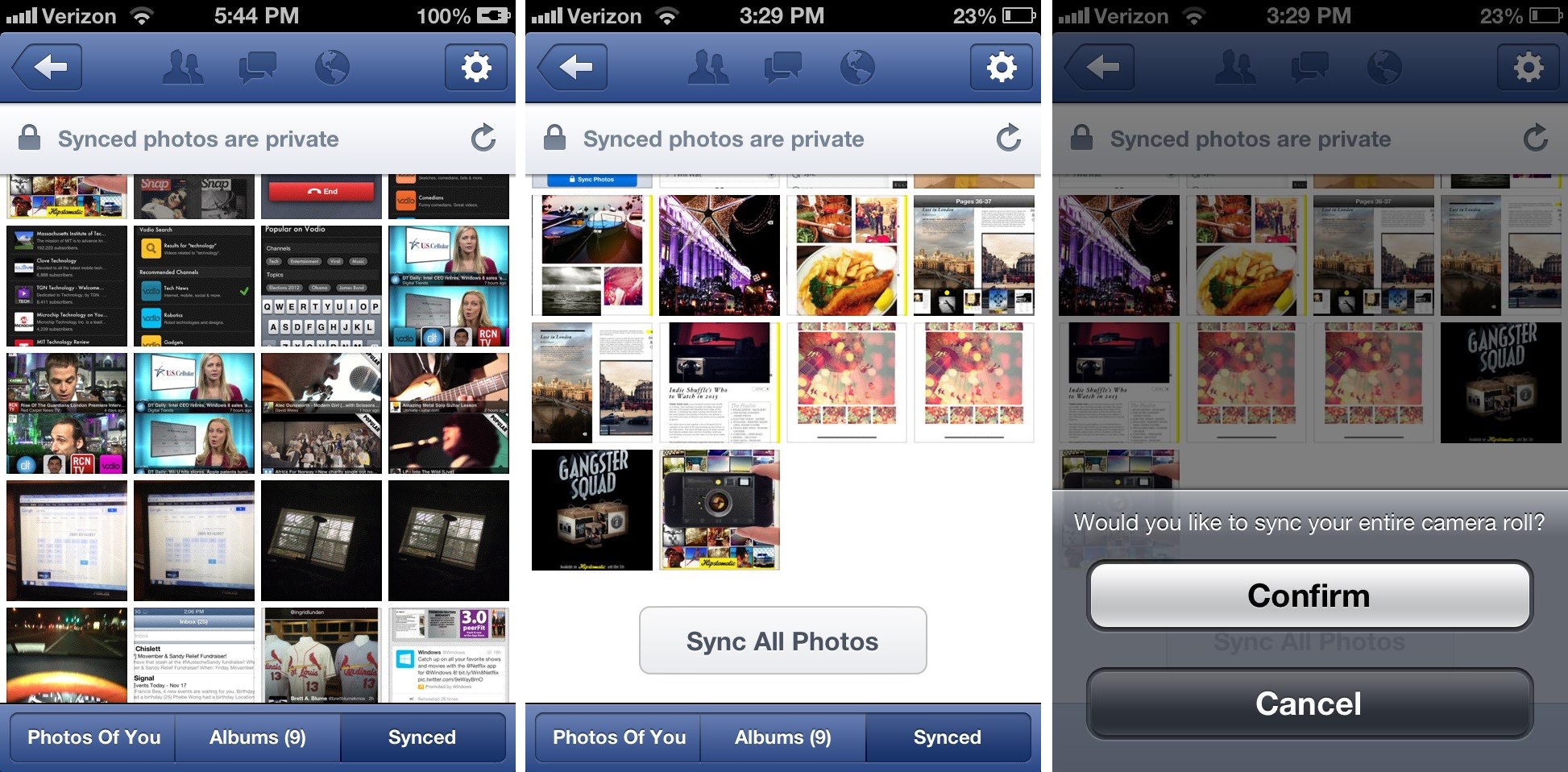
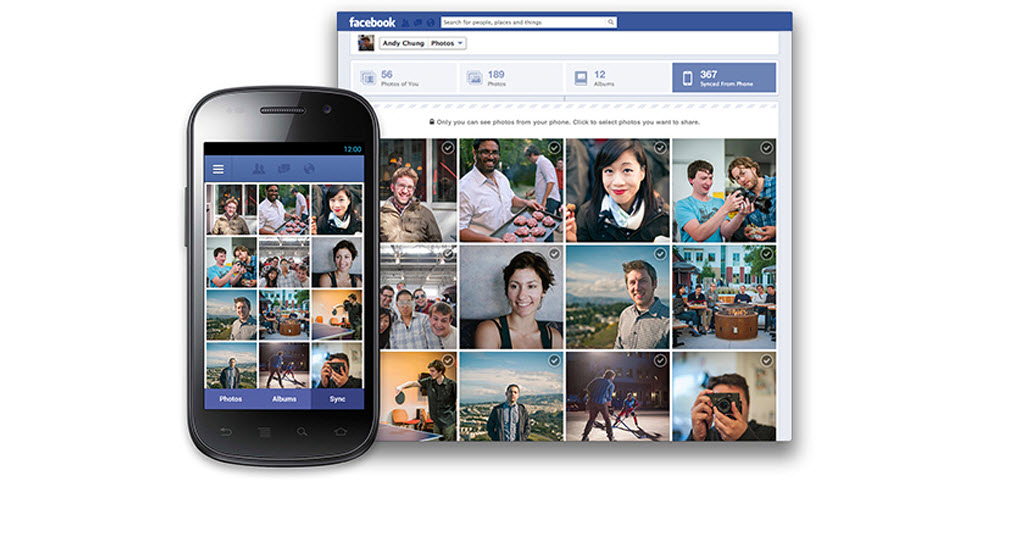
Facebook has unveiled a new feature for iOS and Android users titled Photo Sync. Over the years, Facebook has improved its functionality for handheld devices, particularly smartphones and tablets. The new feature provides users the option of automatically syncing all the photos they have on their phone with Facebook. As of now, the feature is optional and its pros and cons are still under a cloud.


According to Facebook, the photos would be retrieved from the user’s phone without prompting and uploaded to the social network. However, they would not be shared with the user’s friends or public and will be kept in a private album. From there, the user has the option of deciding whether or not he/she wants to share those pictures with his/her friends.

This provides a highly convenient option for Android and iPhone users. They no longer have to manually upload the photos they snap to Facebook. All they need to do now is take the pictures and Facebook will take care of the rest. This is especially a great feature for the users who like to take pictures on the go. The photos will be uploaded to the website directly and then the user can decide which ones he/she wants to make public.

However, the new feature has already come under fire from some quarters. Market experts claim this is another ploy from Facebook to invade their users’ privacy. It is true to a certain extent as Facebook can now retrieve your pictures from your smartphone and upload it without asking you. If you have activated the automatic Photo Sync, there would be no stopping the social network from accessing the photos you have stored on your phone.

Even though the user gets to decide whether or not the photos are to be shared, they are still being saved online on Facebook’s servers. The social network has access to them if and when it wants. There is no word yet from the company itself about how it would implement the privacy policy on a feature such as this one.
Facebook has promised it does not share any content uploaded or posted by the user without permission. Yet, it remains to be seen whether they treat the photos uploaded automatically through Photo Sync in the same way. With over 300 million pictures being uploaded to Facebook daily, Photo Sync is one feature which has the potential to catch on.

[Images via idownloadblog, theverge & digitaltrends]

Tuesday, 12 February 2013

New Facebook Covers


Related Posts Plugin for WordPress, Blogger...