Showing posts with label Online. Show all posts
Showing posts with label Online. Show all posts
Friday, 25 January 2013
Wednesday, 9 January 2013
RECORDING ONLINE MUSIC, How To Record Voice In Mp3
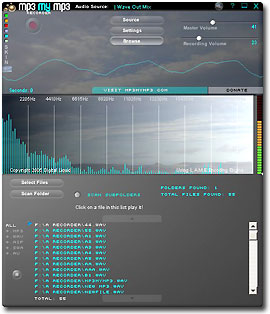
Using this MP3 recorder u can record any sound (online music,online conversations etc..)which plays in ur computer and it is absolutely free of cost.U can visit Downlaod to download.
METHOD TO ACTIVATE MP3 RECORDER:
1.After downloading the mp3 recorder press the "record mixer" button and select stereo mix if u want to record online music.
2.Now just select a song which u want to play in any player keep ur mp3 recorder ready and then press the "RED" buttonand when u finish recording press the "white" button (which is adjacent to the red button).
3. Then u will find "save to wav" and "save to mp3" (below the red and white buttons) .Select anyone of these to save ur recordings on ur PC.
NOTE:
Adjust the bit rate before u record.
Sunday, 30 December 2012
PrettyPenny.com, Online Couponing For Young Women
Couponing has always been a popular activity, and when the economy takes a downturn, it becomes even more so. With the advent of online couponing, more people have discovered this brilliant way to save money, even leading the way to what has been called "extreme couponing". And just when we thought that nothing new could come up in this arena, a young startup called Pretty Penny is making a splash.

The main difference that Pretty Penny has to offer is their target market. They are all about online couponing, but their goal is to offer their services to the young, female audience.
One might say that the online couponing scene is pretty much saturated, but one look at Pretty Penny might be enough to at least give it a chance. For one, the moment you visit the site, you don’t really get that couponing feel – except for the copy that does not let you forget about how you can save money using coupons without having to actively search for them.
How does it work?
What makes Pretty Penny attractive is that you simply have to install it once, and you don’t have to do all that messy work looking for coupons and deals. All you need to do is browse your favorite online shops as you normally do. Pretty Penny does the work in the background, bringing to your attention coupons or sales that are available on that site. For busy shoppers – young or old alike – this convenience is most welcome!
The drawback – for now
The big drawback right now is the fact that the browser extension that opens up this convenient shopping experience is the fact that the extension is only available for Google Chrome. You can visit the web site and learn more about Pretty Penny using other browsers, but you can only really benefit from it using Chrome.
All the more reason to use this browser, yes?
[Image via Pretty Penny]

The main difference that Pretty Penny has to offer is their target market. They are all about online couponing, but their goal is to offer their services to the young, female audience.
One might say that the online couponing scene is pretty much saturated, but one look at Pretty Penny might be enough to at least give it a chance. For one, the moment you visit the site, you don’t really get that couponing feel – except for the copy that does not let you forget about how you can save money using coupons without having to actively search for them.
How does it work?
What makes Pretty Penny attractive is that you simply have to install it once, and you don’t have to do all that messy work looking for coupons and deals. All you need to do is browse your favorite online shops as you normally do. Pretty Penny does the work in the background, bringing to your attention coupons or sales that are available on that site. For busy shoppers – young or old alike – this convenience is most welcome!
The drawback – for now
The big drawback right now is the fact that the browser extension that opens up this convenient shopping experience is the fact that the extension is only available for Google Chrome. You can visit the web site and learn more about Pretty Penny using other browsers, but you can only really benefit from it using Chrome.
All the more reason to use this browser, yes?
[Image via Pretty Penny]
Thursday, 27 December 2012
Type in Punjabi Online Easily with Virtual Punjabi Keyboard
Sometimes we want to update our Facebook status in Punjabi or write something in friend’s scrapbook in Punjabi in Orkut. But we don’t know how to type it in Punjabi. It’s also very common question among Punjabi internet users "How to type in Punjabi online?". Today I came across a website which let you type in Punjabi language very easily.

Virtual Punjabi Keyboard is an online tool to type in Punjabi. You can use the Punjabi words anywhere on Blogs, MS Word documents, Web Community Portals, your Web Profiles, etc. It has really nice interface. The Punjabi letters are written on the keyboard along with english alphabets for your convenience. So what are you waiting? Start writing in Punjabi, cope and paste it in your friends wall.

Virtual Punjabi Keyboard is an online tool to type in Punjabi. You can use the Punjabi words anywhere on Blogs, MS Word documents, Web Community Portals, your Web Profiles, etc. It has really nice interface. The Punjabi letters are written on the keyboard along with english alphabets for your convenience. So what are you waiting? Start writing in Punjabi, cope and paste it in your friends wall.
Wednesday, 26 December 2012
How to Protect Young Kids Online
It’s important to protect kids when they are online. Even a few simple steps can protect the safety and privacy of your children. Preventative measures for parents fall primarily into two categories: technological and behavioural.

Technological Protection
It’s up to you to decide what your child is and isn’t allowed to view on the internet. Once you deem something inappropriate, you can use software to block the content. Most operating systems include parental control features in order to allow parents to manage their children’s computer use. Other software allows you to filter select information based upon each child’s age. Features often include the ability to limit searches, block specific websites, and monitor online activity.
Parental controls are also often available on gaming technology, which helps you to restrict your child’s ability to play inappropriate games or watch inappropriate movies. Web browsers also allow you to set your security and privacy preferences. You can also view all of the places your children visited online, by viewing your Internet history. You can also configure your software to allow only approved contacts when using instant messaging features.
You can also create multiple user accounts for your computer. You can give yourself an Administrator account and your children limited user accounts. As Administrator, you would retain full control over the computer, whereas limited users would not be able to change system settings or install new hardware or software.
Behavioral Measures
While parental control technology has its place in protecting kids, you cannot rely on it alone. Simply talking to your kids about appropriate internet usage can be one of the most powerful tools a parent can use. Remind your kids not to talk to people they don’t know online. Teach them to never give out their phone number or address, never send photographs of themselves and never meet with someone they met online without your supervision.
Keep computers in public areas of the home, such as the kitchen or family room. Talk to them about issues of internet etiquette, cyber bullying, and privacy. Communicate your expectations and set up clear consequences for any violations. By establishing clear boundaries, you can help your kids have a safe online experience.
[Image via live4]

Technological Protection
It’s up to you to decide what your child is and isn’t allowed to view on the internet. Once you deem something inappropriate, you can use software to block the content. Most operating systems include parental control features in order to allow parents to manage their children’s computer use. Other software allows you to filter select information based upon each child’s age. Features often include the ability to limit searches, block specific websites, and monitor online activity.
Parental controls are also often available on gaming technology, which helps you to restrict your child’s ability to play inappropriate games or watch inappropriate movies. Web browsers also allow you to set your security and privacy preferences. You can also view all of the places your children visited online, by viewing your Internet history. You can also configure your software to allow only approved contacts when using instant messaging features.
You can also create multiple user accounts for your computer. You can give yourself an Administrator account and your children limited user accounts. As Administrator, you would retain full control over the computer, whereas limited users would not be able to change system settings or install new hardware or software.
Behavioral Measures
While parental control technology has its place in protecting kids, you cannot rely on it alone. Simply talking to your kids about appropriate internet usage can be one of the most powerful tools a parent can use. Remind your kids not to talk to people they don’t know online. Teach them to never give out their phone number or address, never send photographs of themselves and never meet with someone they met online without your supervision.
Keep computers in public areas of the home, such as the kitchen or family room. Talk to them about issues of internet etiquette, cyber bullying, and privacy. Communicate your expectations and set up clear consequences for any violations. By establishing clear boundaries, you can help your kids have a safe online experience.
[Image via live4]
Monday, 3 September 2012
Sunday, 2 September 2012
Friday, 31 August 2012
Subscribe to:
Posts (Atom)


