Showing posts with label Sciense. Show all posts

Friday, 15 March 2013

view of the night sky above the Mars

A view of the night sky above the Mars Desert Research Station (MDRS) is seen outside Hanksville in the Utah desert March 2, 2013. The MDRS aims to investigate the possibility of a human exploration of Mars and takes advantage of the Utah desert's Mars-like terrain to simulate working conditions on the red planet. Scientists, students and enthusiasts work together to develop field tactics and study the terrain while wearing simulated spacesuits ...

Via plus.google.com

Friday, 8 March 2013

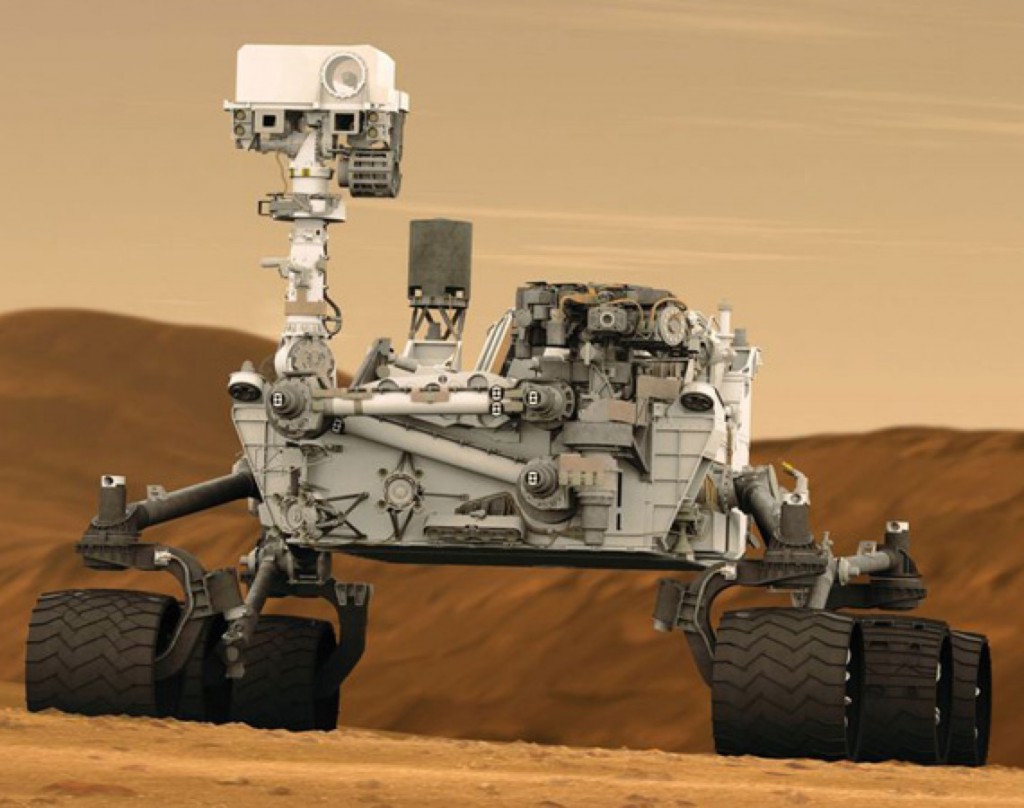
NASA’s Rover Curiosity Has a Computer Glitch

Even space robots can have a bad day.  At least, that’s the latest news coming from NASA regarding Curiosity, the Mars rover.  Curiosity suffered a glitch and had to go into a protective “safe mode.”

It all started when its handlers noticed that there was a problem with the rover’s flash memory on the primary “A-side” computer.  When Curiosity’s handlers switched the rover to its backup computer, it went into a low activity state, a protective “safe mode.”  Curiosity’s handlers are still unsure of the reason for the glitch.

NASA's Rover Curiosity Has a Computer Glitch

NASA engineers have speculated that one possible cause of the glitch could have been impact by a cosmic ray, which is a high-energy charged particle.  Though Curiosity is created with radiation tolerant gear, it can still be vulnerable to damage from cosmic rays.  NASA has indicated that this type of problem has occurred in the past with other pieces of memory on other missions. However, they also report that cosmic ray damage is generally short lived.  Engineers believe that the problem could disappear once the A-side computer is turned back on.

However, the rover is on the way to recovery and is back out of safe mode.  It has resumed using its high-gain antenna and is expected to soon return to its mission.  NASA has stated that Curiosity is the most complex robotic explorer ever sent to another planet. Curiosity on a quest to find out if Mars was ever capable of sustaining microbial life.  It  landed on Mars last August and is on a two-year mission.  In Curiosity’s $2.5 billion quest to investigate the habitability of Mars, the one ton robot has already found multiple signs of the planet’s past exposure to liquid water, including a streambed.  Let’s hope that the glitch can be quickly fixed, so that Curiosity can get back to its important work of satisfying our Curiosity about the possibility of life on Mars.
Credits = TechBeat.Com

Thursday, 7 March 2013

Create A Calculator Using JavaScript CSS HTML, Use Online Calculator

Hi Dear Visitors and Friends.....!
AS we all know that mathematics is very important for us and we can create any calculation using calculator and we can also create and develop calculator by using all of the programming language like C, C++, Java, etc. bt today we willl give the Calculator which is made by HTML CSS and JavaScript.


You can easily use calculator on your Blog/website very easily.This Calculator is made by using JavaScript, CSS, HTML.

Use This For Demo...!
Calculator


Codes of  Calculator

Copy All Code And Paste In Your Website

    <style>
    /*----- Calculator By www.umerprince.blogspot.com ------ */

    .btnLogin
    {
        -moz-border-radius:2px;
        -webkit-border-radius:2px;
        border-radius:15px;
        background:#a1d8f0;
        background:-moz-linear-gradient(top, #badff3, #7acbed);
        background:-webkit-gradient(linear, center top, center bottom, from(#badff3), to(#7acbed));
        -ms-filter: "progid:DXImageTransform.Microsoft.gradient(startColorStr='#badff3', EndColorStr='#7acbed')";
        border:1px solid #7db0cc !important;
        cursor: pointer;
        padding:11px 16px;
        font:bold 11px/14px Verdana, Tahomma, Geneva;
        text-shadow:rgba(0,0,0,0.2) 0 1px 0px;
        color:#fff;
        -moz-box-shadow:inset rgba(255,255,255,0.6) 0 1px 1px, rgba(0,0,0,0.1) 0 1px 1px;
        -webkit-box-shadow:inset rgba(255,255,255,0.6) 0 1px 1px, rgba(0,0,0,0.1) 0 1px 1px;
        box-shadow:inset rgba(255,255,255,0.6) 0 1px 1px, rgba(0,0,0,0.1) 0 1px 1px;
        margin-center:12px;
        float:center;
        padding:7px 21px;
    }

    .btnLogin:hover,
    .btnLogin:focus,
    .btnLogin:active{
        background:#a1d8f0;
        background:-moz-linear-gradient(top, #7acbed, #badff3);
        background:-webkit-gradient(linear, center top, center bottom, from(#7acbed), to(#badff3));
        -ms-filter: "progid:DXImageTransform.Microsoft.gradient(startColorStr='#7acbed', EndColorStr='#badff3')";
    }
    .btnLogin:active
    {
        text-shadow:rgba(0,0,0,0.3) 0 -1px 0px;
    }
    /*----- Calculator By www.umerprince.blogspot.com ------ */
    </style>


      <script language='JavaScript'>
      <!--------------------------------------------------------------------
        Memory  = "0";      // initialise memory variable
        Current = "0";      //   and value of Display ("current" value)
        Operation = 0;      // Records code for eg * / etc.
        MAXLENGTH = 30;     // maximum number of digits before decimal!

    function AddDigit(dig)          //ADD A DIGIT TO DISPLAY (keep as 'Current')
     { if (Current.indexOf("!") == -1)  //if not already an error
        { if (    (eval(Current) == 0)
                  && (Current.indexOf(".") == -1)
             ) { Current = dig;
               } else
               { Current = Current + dig;
               };
          Current = Current.toLowerCase(); //FORCE LOWER CASE
        } else
        { Current = "Hint! Press 'AC'";  //Help out, if error present.
        };
       if (Current.indexOf("e0") != -1)
         { var epos = Current.indexOf("e");
           Current = Current.substring(0,epos+1) + Current.substring(epos+2);
         };
      if (Current.length > MAXLENGTH)
         { Current = "Aargh! Too long"; //don't allow over MAXLENGTH digits before "." ???
         };
       document.Calculator.Display.value = Current;
     }

    function Dot()                  //PUT IN "." if appropriate.
     {
      if ( Current.length == 0)     //no leading ".", use "0."
        { Current = "0.";
        } else
        {  if (   ( Current.indexOf(".") == -1)
                &&( Current.indexOf("e") == -1)
              )
             { Current = Current + ".";
        };   };
      document.Calculator.Display.value = Current;
     }

    function DoExponent()
     {
      if ( Current.indexOf("e") == -1 )
           { Current = Current + "e0";
             document.Calculator.Display.value = Current;
           };
     }

    function PlusMinus()
     {
      if  (Current.indexOf("e") != -1)
        { var epos = Current.indexOf("e-");
          if (epos != -1)
             { Current = Current.substring(0,1+epos) + Current.substring(2+epos); //clip out -ve exponent
             } else
             { epos = Current.indexOf("e");
               Current = Current.substring(0,1+epos) + "-" + Current.substring(1+epos); //insert -ve exponent
             };
        } else
        {  if ( Current.indexOf("-") == 0 )
             { Current = Current.substring(1);
             } else
             { Current = "-" + Current;
             };
           if (    (eval(Current) == 0)
                && (Current.indexOf(".") == -1 )
              ) { Current = "0"; };
        };
      document.Calculator.Display.value = Current;
     }

    function Clear()                //CLEAR ENTRY
     { Current = "0";
       document.Calculator.Display.value = Current;
     }

    function AllClear()             //Clear ALL entries!
     { Current = "0";
       Operation = 0;                //clear operation
       Memory = "0";                  //clear memory
       document.Calculator.Display.value = Current;
     }

    function Operate(op)            //STORE OPERATION e.g. + * / etc.
     {
     if (Operation != 0) { Calculate(); }; //'Press "=" if pending operation!
     // note that design is not good for showing *intermediate* results.

      if (op.indexOf("*") > -1) { Operation = 1; };       //codes for *
      if (op.indexOf("/") > -1) { Operation = 2; };       // slash (divide)
      if (op.indexOf("+") > -1) { Operation = 3; };       // sum
      if (op.indexOf("-") > -1) { Operation = 4; };       // difference

      Memory = Current;                 //store value
      // note how e.g. Current.value gives neither error nor value! ***
      Current = "";
      document.Calculator.Display.value = Current;
     }

    function Calculate()            //PERFORM CALCULATION (= button)
     {
      if (Operation == 1) { Current = eval(Memory) * eval(Current); };
      if (Operation == 2)
        { if (eval(Current) != 0)
          { Current = eval(Memory) / eval(Current)
          } else
          { Current = "Aargh! Divide by zero"; //don't allow over MAXLENGTH digits before "." ???
          }
        };
      if (Operation == 3) { Current = eval(Memory) + eval(Current); };
      if (Operation == 4) { Current = eval(Memory) - eval(Current); };
      Operation = 0;                //clear operation
      Memory = "0";                  //clear memory
      Current = Current + "";       //FORCE A STRING!
      if (Current.indexOf("Infinity") != -1)        //eg "1e320" * 1
        { Current = "Aargh! Value too big";
        };
      if (Current.indexOf("NaN") != -1)        //eg "1e320" / "1e320"
        { Current = "Aargh! I don't understand";
        };
      document.Calculator.Display.value = Current;
      // NOTE: if no operation, nothing changes, Current is left the same!
     }

    function FixCurrent()
     {
      Current = document.Calculator.Display.value;
      Current = "" + parseFloat(Current);
      if (Current.indexOf("NaN") != -1)
        { Current = "Aargh! I don't understand";
        };
      document.Calculator.Display.value = Current;
     }

      //--------------------------------------------------------------->
      </script>

    </head>
    <body>

    <div align="center"><table width="95%"><tr><td> <!-- OUTER MARGIN -->
    <font face="Verdana, Arial, Helvetica">

    <div align="center"><table border="0"><tr><td width="15%" align="center"><p>&nbsp;</p>
    <div align="center">
    <FORM name="Calculator">
    <table width="30%" border="4" bgcolor="#809FFE"><tr>      <!--OUTER MARGIN OF CALCULATOR-->
    <td colspan="2" align="center">

      <p><b><font face="Verdana, Arial, Helvetica" color="#00000" size="3">Calculator</font></b><b><font face="Verdana, Arial, Helvetica" color="#00000" size="3"><br>
        </font>
              <font face="Courier" size="5">
              <input type="text" maxlength="40" size="25" name="Display" onChange="FixCurrent()">
                      </font></b>    </p>
      </td></tr>
    <tr><td width="65%" align="center">                   <!--left panel------>

    <br><table><tr>
      <td><input type="button" class="btnLogin" name="seven" value="   7    " OnClick="AddDigit('7') "></td>
      <td><input type="button" class="btnLogin" name="eight" value="   8    " OnClick="AddDigit('8')"></td>
      <td><input type="button" name="nine"  class="btnLogin" value="   9    " OnClick="AddDigit('9')"></td>
    </tr><tr>
      <td><input type="button" name="four"  class="btnLogin" value="   4    " OnClick="AddDigit('4')"></td>
      <td><input type="button" name="five"  class="btnLogin" value="   5    " OnClick="AddDigit('5')"></td>
      <td><input type="button" name="six"  class="btnLogin"  value="   6    " OnClick="AddDigit('6')"></td>
    </tr><tr>
      <td><input type="button" name="one"  class="btnLogin" value="   1    " OnClick="AddDigit('1')"></td>
      <td><input type="button" name="two"  class="btnLogin" value="   2    " OnClick="AddDigit('2')"></td>
      <td><input type="button" name="three"  class="btnLogin"  value="   3    " OnClick="AddDigit('3')"></td>
    </tr><tr>
      <td><input type="button" name="plusmin"  class="btnLogin" value="  +/-  " OnClick="PlusMinus()"></td>
      <td><input type="button" name="one"  class="btnLogin" value="   0    " OnClick="AddDigit('0')"></td>
      <td><input type="button" name="two"  class="btnLogin" value="    .    " OnClick="Dot()"></td>
    </tr>
    </table><br/>


    </td>                                   <!--end left panel-->
    <td width="35%" align="center">                     <!--right panel----->

    <br><table><tr>
      <td><input type="button" name="clear"  class="btnLogin" value="    C     " OnClick="Clear()"></td>
      <td><input type="button" name="AC"  class="btnLogin" value="   AC    " OnClick="AllClear()"></td>
    </tr><tr>
      <td><input type="button" name="mul"  class="btnLogin" value="     *     " OnClick="Operate('*')"></td>
      <td><input type="button" name="div"  class="btnLogin" value="     /      " OnClick="Operate('/')"></td>
    </tr><tr>
      <td><input type="button" name="add"  class="btnLogin" value="    +     " OnClick="Operate('+')"></td>
      <td><input type="button" name="sub"  class="btnLogin" value="     -      " OnClick="Operate('-')"></td>
    </tr><tr>
      <td><input type="button" name="result"  class="btnLogin" value="     =    " OnClick="Calculate()"></td>
      <td align="right"><input type="button" name="exp"  class="btnLogin" value="  E X P  " OnClick="DoExponent()"></td>
    </tr></table><br/>


    </td>                                   <!--end right panel-->
    </tr></table>                          <!--END OUTER MARGIN CALC------->
    </FORM></div>


Use These Codes in Our HTML Editor

If Any Problem Comes, Ask in Comments
Credits = widgetgenerators.blogspot.com

Saturday, 26 January 2013

Dolphins form life raft to help dying friend


Everybody's favourite cetacean just got a little more lovable. For the first time, dolphins have been spotted teaming up to try to rescue an injured group member. The act does not necessarily mean dolphins are selfless or can empathise with the pain of their kin, however.

Kyum Park of the Cetacean Research Institute in Ulsan, South Korea, and colleagues were surveying cetaceans in the Sea of Japan in June 2008. They spent a day following a group of about 400 long-beaked common dolphins (Delphinus capensis).

In the late morning they noticed that about 12 dolphins were swimming very close together. One female was in difficulties: it was wriggling and tipping from side to side, sometimes turning upside-down. Its pectoral flippers seemed to be paralysed.

Life raft

The other dolphins crowded around it, often diving beneath it and supporting it from below. After about 30 minutes, the dolphins formed into an impromptu raft: they swam side by side with the injured female on their backs. By keeping the injured female above water, they may have helped it to breathe, avoiding drowning (see video, above).

After another few minutes some of the helper dolphins left. The injured dolphin soon dropped into a vertical position. The remaining helpers appeared to try and prop it up, possibly to keep its head above the surface, but it soon stopped breathing, say the researchers. Five dolphins stayed with it and continued touching its body, until it sank out of sight.

"It does look like quite a sophisticated way of keeping the companion up in the water," says Karen McComb at the University of Sussex in Brighton, UK. Such helping behaviours are only seen in intelligent, long-lived socialanimals. In most species, injured animals are quickly left behind.

For the love of pod

While it may seem selfless to help an injured fellow, McComb says the helper dolphins might get some benefit. Rescuing the struggling dolphin could help maintain their group, and thus control of their territory. Furthermore, if the group contains close relatives, protecting those relatives helps the dolphins preserve their shared genes.

The simple act of working together could also bond the group more strongly. "It makes a lot of sense in a highly intelligent and social animal for there to be support of an injured animal," McComb says.

The act of helping also seems to suggest that the dolphins understand when others are suffering, and can even empathise: that is, imagine themselves in the place of the suffering dolphin. But while this is possible, McComb says the helping behaviour could evolve without the need for empathy.

There have been reports of single dolphins helping others, generally mothers helping their calves, but no cases of groups of dolphins working together to help another. Dolphins have also been seen interacting with the corpses of dead dolphins, which some researchers interpret as a form of mourning.

Journal reference: Marine Mammal Science, doi.org/kbb
.

Dung beetles navigate using the Milky Way

UmerPrinceEver look up at the stars and wonder if some bug-eyed creature is doing the same? It turns out at least one does: the dung beetle uses the glow of the Milky Way to navigate.

Once a beetle (Scarabaeus satyrus) has constructed its dung ball, it moves off in a straight line in order to escape from rival beetles as quickly as possible, lest they try and steal its carefully crafted ball. This behaviour doesn't sound complicated, but several years ago, Marie Dacke of Lund University in Sweden and colleagues showed that polarised light from the moon is important for dung beetles to keep to a straight line.

Then the researchers were surprised to find the insects were able to stay on course even on a moonless night. "We thought there was something wrong in our set-up," Dacke says.

The team allowed the beetles to crawl around the floor of a plain-walled cylindrical drum with an open top, meaning they could only use the night sky to orientate themselves. The researchers timed how long it took the beetles to reach the edge of the drum from the centre, and found that under a full moon, the insects took around 20 seconds on average; on a starry but moonless night, they took around 40 seconds.

But when beetles had a cardboard cap placed on them to prevent them from seeing the sky, they needed over two minutes, suggesting the stars were playing a role.

Planetarium clincher

To test this, the team moved the experiment to a planetarium. By switching stars on and off, Dacke discovered that the glowing strip of the whole Milky Way was what guided the beetles' movement. "Before it was assumed insects could not use the stars because their eyes don't have the resolution to see them," she says. Navigating using the whole of the Milky Way does away with the need to see individual stars.

Dacke says the results suggest moths, locusts and other insects might navigate by the Milky Way, too. Her team is now looking at whether the beetles prefer to navigate by the moon or the Milky Way when both are on view.

Journal reference: Current Biology, doi.org/kbm
.

Saturday, 3 November 2012

Balancing Act

Balance. We all need it.

Anytime I need to be reminded of the beauty of balance, I head to Garden of the Gods' to ride by my favorite landmark: Balance Rock.

Tourists flock to the area, often poised underneath one of the balance points to show how they contribute to the rocks balance. But take those people away, and the rock balances well on its own, as it has and as it will continue to.

Everyone has their unique balance point. It comes in as many shapes and forms as there are people in the world. Each sense of balance is linked to core values and how you've aligned your life to them. Friends and family, career, recreation, love and relationships, physical environment, money, health, and personal growth - to name a few. It's all part of who we are.

So when you find yourself feeling out of balance and ready to topple, take a step back. Look at your life as a whole. Figure out where the imbalance is coming from and take action to improve it. There are helpers along the way that can give you new perspectives and challenges if you feel stuck. But ultimately it's up to you to make the change.

Ready to start living that balanced life of your dreams? I'm ready to help. Please contact me.


Related Posts Plugin for WordPress, Blogger...